

Description
Download AI Music Maker Cover Songs – AI Song Generator, Image-to-Music, Cover Song Creator
Overview
AI Music Maker Cover Songs is an innovative Android application tailored for music enthusiasts, songwriters, and digital content creators. Designed to simplify the music creation process, the app enables users to generate original songs using AI technology. It supports transforming lyrics or images into fully composed tracks across diverse genres such as pop, rap, and EDM. The tool also features a dedicated cover song generator, allowing users to reimagine existing songs with personalized vocal styles and arrangements. Its primary purpose is to empower individuals without formal music training to produce unique audio content with minimal effort. The application is ideal for personal expression, social media content, podcast intros, or creative experimentation. Users can input text, upload visual content, and select emotional tones to shape the final output. The developer did not provide additional details about the company or development background. Real-world usage scenarios include creating background music for videos, generating original tracks for YouTube content, or exploring musical ideas without traditional instruments. The app is available for free download on Android devices, offering a low-barrier entry point for creative exploration.
Key Features & Capabilities
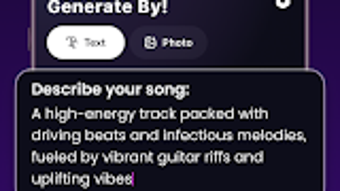
- AI Song Generator: Converts typed lyrics or text prompts into complete musical compositions with melody, harmony, and rhythm, supporting multiple genres and moods.
- Image-to-Music Conversion: Translates visual content into audio, enabling users to create music inspired by photos, artwork, or digital designs.
- Cover Song Generator: Allows users to generate AI-powered renditions of existing songs with customizable vocal styles and genre adaptations.
- Lyric Assistance: Offers AI-generated lyrical suggestions to help users compose or refine their song content.
- Genre and Mood Selection: Users can choose from various musical styles and emotional tones to influence the character of the generated music.
- Project Management: Enables saving, editing, and sharing of created tracks, with options to keep projects private or distribute them across platforms.
These features streamline the creative workflow by eliminating the need for traditional music production skills. For example, a content creator can upload a landscape photo and generate an ambient instrumental piece to accompany a travel vlog. A songwriter might use the AI lyric assistant to overcome writer’s block, then refine the output into a full song. The cover song generator allows fans to reinterpret popular tracks in new styles, such as turning a pop hit into a jazz version. The integration of genre and mood controls ensures that the final output aligns with the user’s vision. The app’s focus on accessibility makes it suitable for beginners while still offering creative depth for intermediate users.
User Interface, Workflow & Performance
The application features a user-friendly interface designed for intuitive navigation, with clearly labeled sections for input, genre selection, and output preview. Users can access core functions through a streamlined workflow: input lyrics or upload an image, select genre and emotional tone, and initiate generation. The interface supports touch-based interaction, making it well-suited for mobile use. Navigation between project creation, editing, and sharing is straightforward, minimizing the learning curve. The developer did not specify resource usage details, so exact performance behavior, such as CPU or RAM consumption, remains unknown. However, based on general software behavior patterns, the app likely operates efficiently within standard Android device limitations. Stability during extended use was not documented, and no reports on crashes or freezes were provided. The app’s performance may vary depending on device capabilities, but it is designed to function smoothly on modern Android smartphones and tablets. Offline functionality is supported, allowing users to create and edit projects without an internet connection.
Compatibility & System Requirements
AI Music Maker Cover Songs is available exclusively for Android devices. The app is designed to run on current and recent versions of the Android operating system, though specific version requirements were not listed. Installation size was not disclosed, so exact storage needs remain unclear. The developer did not provide detailed hardware specifications or minimum system requirements. Compatibility information is limited to the platform and operating system. Users should ensure their device meets general Android app standards for memory, processing power, and storage. No support for Windows, Mac, or other desktop environments was mentioned. The app’s reliance on AI processing may impact performance on older or low-end devices, but no official thresholds were provided. For optimal experience, users are advised to use devices with up-to-date Android versions and sufficient internal storage.
Pros and Cons
Pros
- Accessible to users with no music production experience.
- Supports multiple creative input methods: text, images, and vocal style selection.
- Offers AI-assisted lyric writing and song generation.
- Enables creation of cover songs with customizable styles.
- Free to download and use on Android devices.
- Allows offline project creation and editing.
Cons
- Available only on Android, limiting cross-platform use.
- Exact system requirements and performance data were not provided.
- Limited to mobile devices; no desktop or PC version available.
- AI-generated content may lack the nuance of human-composed music.
- Privacy and data handling practices were not specified.
FAQ Section
Is AI Music Maker Cover Songs available for Windows or Mac?
The app is currently available only for Android devices. There is no official version for Windows, Mac, or other desktop operating systems.
Can I use the app without an internet connection?
Yes, the app supports offline functionality, allowing users to create, edit, and save projects without requiring an internet connection.
Is the app free to download and use?
Yes, AI Music Maker Cover Songs is available for free download on Android devices. No payment is required for basic features.
What types of input can I use to generate music?
Users can input text lyrics, upload images, and select vocal styles and emotional tones to guide the AI music generation process.
Does the app support updating or receiving new features?
Updates are likely available through the Google Play Store, though specific update frequency or release schedule was not disclosed.
Final Thoughts
AI Music Maker Cover Songs delivers a compelling solution for individuals seeking an accessible way to create original music without technical expertise. Its integration of AI-driven song generation, image-to-music conversion, and cover song customization offers a versatile toolkit for creative expression. While the app is currently limited to Android and lacks detailed system specifications, its intuitive interface and free access make it a strong choice for mobile content creators and music beginners. The ability to generate tracks from text or visuals opens new avenues for artistic experimentation. Despite the absence of desktop support, the app’s focus on simplicity and innovation positions it as a valuable tool in the growing field of AI-powered music creation. For those looking to explore music production on the go, this application offers a seamless and engaging experience. Download AI Music Maker Cover Songs now.
Guides & Tutorials for AI Music Maker Cover Songs
How to install AI Music Maker Cover Songs
- Click the Preview / Download button above.
- Once redirected, accept the terms and click Install.
- Wait for the AI Music Maker Cover Songs download to finish on your device.
How to use AI Music Maker Cover Songs
This software is primarily used for its core features described above. Open the app after installation to explore its capabilities.
User Reviews for AI Music Maker Cover Songs 0
No reviews found





